


Chances are good that the speakers built-in to your gaming laptop or PC monitor (if it even has speakers) aren’t pumping quality sound. If you’re playing games where sound cues mean life or death, rocking out to an album meant to get your heart thumping, or editing the audio on your latest YouTube video, you want a rich, dynamic sound to help make the most of your listening experience. That’s where computer speakers come in handy, blowing the built-in speakers on your devices out of the water.
With computer speakers, you often get a woofer and tweeter providing a full range of audio frequencies, which built-ins and headsets can’t offer. There are a plethora of options out there with a variety of features. Some speakers focus on leaving a smaller footprint to keep your desk setup tidy, while others offer bookshelf speakers and sometimes even a subwoofer to get a more powerful sound. Connectivity is always important, and many of our favorites tote Bluetooth alongside wired connections, so you aren’t limited to just pairing the speakers with your computer. Below, we’ve done a lot of the heavy lifting, giving you a comprehensive list of the best computer speakers, ranging in size, price, and features - and click here to see them in the UK.
Type: 2.0 | Drivers: 4.5” high-excursion fiber composite cone woofers, 1” Titanium LTS vented tweeter with Tractrix horn | Power Output: 160W | Inputs: HDMI-ARC with CEC, Bluetooth wireless technology, Phono/line analog, 3.5mm analog mini jack, USB digital, Optical digital | Outputs: Single RCA line level output | Size (Per Speaker): 12” X 6.5” X 9.25”
Klipsch’s The Fives expertly blends the best of both worlds. These speakers come with a wide variety of input options that fall in line with the modern-day soundbar. But, instead of the sound being produced from a singular piece of equipment, the Fives achieves perfect stereo separation that has long been a custom characteristic of a great pair of speakers. It has plenty of power to compliment your computer with room-filling sound, thanks to ultra-low noise amplifiers specifically built to maximize performance without needing an external amp. You’ll enjoy the crisp, nuanced audio with rich bass, whether you’re rocking out to your favorite songs, watching videos on Youtube, or PC gaming.
The Fives aren’t just for computers, though. As we mentioned, these speakers pack loads of connectivity, including Bluetooth, HDMI-ARC, Optical, and Phono, so they’re versatile enough to work alongside everything from turntables to TVs and smartphones. Additionally, The Fives exudes a classic aesthetic, taking inspiration from vintage Klipsch speakers. The drivers are enclosed in a hand-crafted wood cabinet that’s available in either a walnut veneer or matte black finish. And if you’re searching for more low end than The Fives’ 4.5” long-throw woofers are capable of, you can add a powered subwoofer to the mix.
Type: 2.0 | Drivers: 4’ mid woofers, 13mm tweeter units | Power Output: 21W | Inputs: Line in 1, Line in 2 | Outputs: Single RCA line level out | Size (Per Speaker): 9.2” X 5.7”
Think of the Edifier R1280Ts as the bargain bin version of The Fives. In principle, Edifier’s powered speakers follow the same wavelength as Klipsch. They’re a stereo pair of capable, powered speakers that offer the ability to add a subwoofer into the mix later on down the line. That said, they don’t quite have the power or detail to produce the same immaculate sound that The Fives are known for. And if you crank them to full volume, you’ll hear audio distortion.
To be fair, the R1280Ts are a fraction of the cost, coming in at around $120, though these bookshelf speakers look higher-end with a classy wooden enclosure. And if you’re worried about setup, it's relatively straightforward with average speaker wires and then an RCA to 3.5 mm jack —which is included— to plug into your computer. Otherwise, you’re all set to get listening as a preamp is built-in. Plus, Edifier’s speakers have a Soundfield Spacializer, meant to simulate a larger soundstage by sending opposite signals to each driver to eliminate interference and improve separation between the two. So, while they may not possess the prowess of the best speakers on our list, the R1280Ts are plenty capable for anyone hoping to get the best bang for their buck.
Type: 2.0 | Drivers: 2.25” full range drivers | Power Output: 8W | Inputs: USB-C to computer (with USB-C to USB-A converter), Bluetooth 5.0 | Outputs: N/A | Size (Per Speaker): 4.8” X 4.7” X 4.6”
Creative has updated its compact, affordable computer speaker options with the Creative Pebble V3. These stylish little speakers don’t cost much more than their V2 predecessors while bumping up the speaker size and bringing in support for Bluetooth audio. Now, you aren’t getting a booming bass with just 4W of output power, and there are basically no sound adjustments with only a gain switch, but these will outshine your computer monitor’s built-in speakers any day. For just $40, that’s not a bad upgrade.
The Creative Pebble V3 speakers leave a minimal footprint, keeping your desk setup simple while providing a big enough sound with voices coming through exceptionally well. They use a single USB-C cable for drawing power and connecting to an audio source. An additional device can connect with a 3.5mm cable if you have an analog audio source. And Bluetooth 5.0 allows you to use them with a plethora of other devices while still enjoying a stable signal across all of them.
Type: 2.1 | Drivers: Two midrange drivers, two tweeters, one 8-inch subwoofer | Power Output: 40W (speakers), 70W subwoofers | Inputs: Auxiliary, Optical, Coaxial, Bluetooth | Outputs: N/A | Size (Per Speaker): 5” X 6” X 8.75” (speaker), 12.3” X 10.4” (subwoofer)
Coming in as the first speaker package in this guide to feature a powered subwoofer, the Edifier S350DB represent an option for those who want some serious thump added to their computer straight out of the box. The subwoofer itself is ported to help get the most impactful bass possible out of your system. To complement all that low end, the S350DB features compact titanium dome tweeters designed to deliver incredibly clear sound at higher frequencies, regardless of the content source. And you can connect to plenty of sources thanks to aux, RCA, optical, and coaxial inputs along with Bluetooth 5.0 support.
The Edifier S350DB won’t offer the same precision found in Klipsch’s The Fives, and they won’t be nearly as cheaply as the Creative Pebble V3 or even Edifier R1280Ts, for that matter. What the S350DB does, though, is provide the most complete package of the bunch while managing to fall in the middle of the pack when it comes to price. You get a stylish wooden veneer on the bookshelf speakers alongside knobs to control volume, bass, and treble, making adjustments to audio a breeze. There’s even a puck-style remote to power on the speaker, adjust the volume, change/pause tracks, and even swap between inputs. So if a full frequency range of sound and ample functionality matters to you, the S350DB is a compelling option to consider for your computer setup.
Type: 5.1 | Drivers: Two 2.5” midrange drivers, two ¾” tweeters, one 6.5” subwoofer | Power Output: 126W | Inputs: Bluetooth 5.0, HDMI ARC, Optical-In, Auxiliary-in, USB-C | Outputs: SXFI out | Size (Per Speaker): 23.6” X 3.74” X 2.44” (Soundbar), 5.9” X 14.4” X 14.4” (soundbar)
The Sound Blaster Katana V2 takes the cake when it comes to surround sound. The system is backed by a tri-amplified design working in unison with Creative’s multicore DSP to properly distribute sound between the Katana V2’s array of midrange drivers, tweeters, and subwoofer. What that all boils down to is a 5.1-channel sound that you can feel while playing games, as well as high-quality audio that works exceptionally well with other content like music and movies. It's not a bad deal for around $250.
The Katana V2 also has a collection of impressive features providing even more value. Scout Mode focuses on the detection of sound, bringing important gameplay moments to life. SXFI Battle Mode puts you in the moment, allowing you to hear directionality in gameplay, such as where a gunshot is coming from in a first-person shooter. There’s also Night Mode for times when your sound needs to be less dynamic, or plug in your preferred set of headphones for continued high-volume listening. In short, this soundbar has the technology to instantly turn your setup into an incredibly capable soundstage. Beyond that, you get loads of connectivity options, including Bluetooth, HDMI ARC, optical, and USB-A, so you can pair the speaker with your PC and pretty much any of your other devices. A programable remote control and RGB lighting complete top off this compact soundbar setup.
Type: 2.1 | Drivers: Two 1.7” cone drivers, one 3” subwoofer driver, two passive radiators| Power Output: 13W | Inputs: HDMI-ARC, two Digital Optical inputs | Outputs: N/A| Size (Per Speaker): 23-⅝” X 2-½” X 3-¾”
Yamaha’s SR-C20A is living proof that bigger isn’t always better. Its sleek soundbar highlights a virtual surround sound technology meant to create an immersive environment far beyond a standard soundbar’s capabilities. You’ll enjoy using this speaker while streaming your favorite shows and even when entrenched in the action of your favorite games, thanks to a few additional features. There’s Yamaha’s Clear Voice technology, which ensures dialogue comes across crystal clear, and a Game Sound Mode aims to enhance specific frequencies, improving your gaming experience. To make life easier, the speaker includes a handy remote, and with it, you can turn on features, adjust volume, change modes, and swap inputs. And speaking of inputs, your computer and other devices should be covered with Bluetooth support and HDMI, optical, or aux connections.
The drawback with the SR-C20A is that it isn’t well-suited for delivering the larger-than-life audio that something like the Sound Blaster Katana V2 is easily capable of. But that’s not what the SR-C20A is all about. You don’t even have the option to add a subwoofer or rears. It’s just a small soundbar that outperforms its weight class and provides a level of clarity that can’t be found in your monitor’s default drivers. And at 23 inches wide, it’s the perfect size to fit neatly under most monitors. If that’s what you’re after, the SR-C20A may be right for you.
Type: 2.0 | Drivers: 5” aramid fiber woofers with advanced voice coils, 0.75” silk dome tweeters with neodymium magnets | Power Output: 150W | Inputs: Bluetooth, 3.5mm stereo mini-jack, RCA L/R | Outputs: RCA variable line-out | Size (Per Speaker): 10.75” X 7” X 9”
If you’re looking to make the most out of Bluetooth connectivity, the AudioEngine A5+ are for you. Armed with Bluetooth and codec support that includes AAC, aptX, and aptX HD, these speakers are built to effortlessly stream high-resolution audio from your preferred device. And with the help of their built-in 24-bit DAC, these speakers can easily slide in as part of a computer setup. Or a TV. Or a turntable. Or anything else that can pass audio to these powerful bookshelf speakers. The bottom line is, even though the A5+ put music first, they’re wildly capable speakers for whatever type of media you choose to throw at them.
The AudioEngine A5+ are the option on this list that comes closest to (and by some accounts surpasses) our top pick, Klipsch The Fives. And that’s thanks to the pure fidelity of these speakers. You get deep bass and clear sound no matter the frequency. And if you decide you want more on the low end, you can always add a subwoofer to the mix, though the two bookshelf speakers provide plenty of stereo separation and sound great on their own.
Type: 2.0 | Drivers: 6.5” low-frequency drivers, 1” soft dome high frequency drivers | Power Output: 112W | Inputs: One XLR female, one TRS female, balanced | Outputs: N/A | Size (Per Speaker): 14.2” X 8.8” X 11.1”
Traditionally, studio monitors designed for music and sound mixing are anything but cheap. The saving grace here is the JBL 306P MkII Powered Studio Monitors, which brings studio-quality sound to the masses for a touch over $300. You’re getting a super dynamic soundstage with impressive bass response. And the audio reveals itself in a way that makes editing relatively simple.
These two bookshelf speakers are outfitted with features precisely engineered to enhance the studio experience. JBL’s Image Control Waveguide, for instance, pinpoints a room-friendly sweet spot to help you experience improved depth and ambiance with the recordings you’re working on. The JBL 306P MkII’s Slip Stream low-frequency port works alongside the monitors’ woofers and low-frequency transducers to replicate the necessary bass levels, which can be utterly essential when it comes to audio editing. As a cherry on the audio editing sundae, these speakers are approved for use near magnetically sensitive equipment. Basically, these monitors are tailor-made to be the heart of your audio editing experience without breaking the bank.
Type: 2.0 | Drivers: Custom woven glass fiber 3-inch drivers | Power Output: N/A | Inputs: 3.5mm connection | Outputs: N/A | Size (Per Speaker): N/A
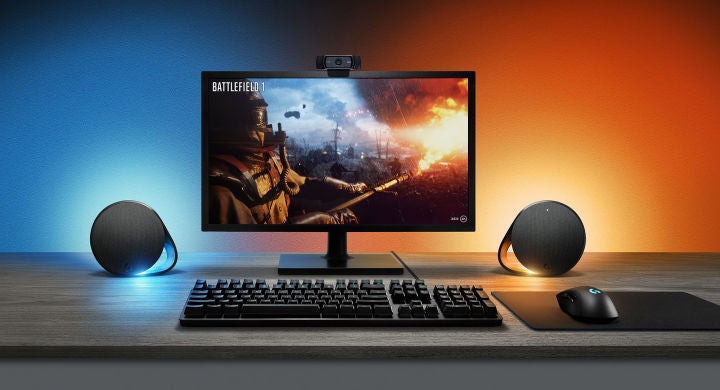
To save the sleekest (and most unique-looking) for last, we have the Razer Nommo Chroma. They don’t have the biggest footprint on this list, but the Nommo Chroma are all about quality. The centerpiece of these speakers are their woven glass fiber drivers, which are designed to produce tighter sound with higher frequencies. Thanks to these drivers, you’ll be able to hear distinct layers and details that just aren’t present in other computer speakers. Beyond that, you have rear-facing bass ports and bass knobs that allow you to completely customize how impactful (or how subtle) you want your low end to be.
Razer packs a whole lot more into the Nommo Chroma, including USB connectivity for a consistent, plus a 3.5mm audio jack as another input option. And, of course, the Razer put millions of colors and pre-set lighting effects at your disposal to help create the gaming environment perfect for your needs and desires. For gaming speakers that both look and act the part, it’s hard to overlook the Razer Nommo Chroma.
To put it mildly, gaming laptops, monitors, and headsets don’t have much space for substantially sized drivers. Without much size to work with, these miniscule speakers typically cannot produce a full range of audio frequencies, which in turn hinders the listening experience.
By contrast, desktop computer speakers break out of that mold thanks to the advantage they have when it comes to size, amplification, and overall components. Most speakers offer a two-way design consisting of a woofer and a tweeter, which work together seamlessly to produce lower and higher frequencies, respectively.
The two-way speaker design does a good job of covering the frequency range of human hearing, generally acknowledged as 20Hz-20kHz, but doesn’t get quite down to the very low end. With music, you don’t need to worry too much about hitting the 20Hz lower threshold, but if you’re watching movies or playing games with a lot of bass, you might want to consider speakers that include a subwoofer, although it will take up extra space under your desk.
You’ll also want your speakers to be powered, meaning they have an amplifier built-in (usually found inside one of the speakers) and will need to be plugged in. The audio signal coming from your computer needs to be amplified before it's sent out through the speaker drivers to your ears.
It's possible to buy an external amplifier and hook up a pair of passive speakers (these are speakers that do not have an integrated amplifier) – though, none of these speakers on the list are passive and they're becoming increasingly rare – but that ends up taking up more space and becomes a bigger hassle overall. Some desktop speakers have a switch that allows you to change the channel output of the powered speaker to either left or right. Being able to assign this can help clean up cable clutter on your desk and lets you place the powered speaker closer to the outlet.
There are a few more options to keep an eye out for and they can make life a bit easier. Having a headphone jack on the front of the speaker can be very convenient when you want to quickly plug in your headphones and not deal with reassigning outputs in your OS. A front-mounted aux-in is an easy way to attach a music source like your phone. Bluetooth functionality is another way some speakers will allow you to attach additional sources.
In summary, there’s an endless collection of speakers available to pair with your PC setup. They each have their own strengths, whether it be the type of media they’re best suited for or the value they offer. Our job is to find the best of these speakers and present them to you, detailing the best traits that make them potential suitors. Your job, should you choose to accept it, is to determine what matters most to you in computer speakers, and make an informed decision about which of today’s countless speaker selections are right for you. Good luck!
Continue reading...
With computer speakers, you often get a woofer and tweeter providing a full range of audio frequencies, which built-ins and headsets can’t offer. There are a plethora of options out there with a variety of features. Some speakers focus on leaving a smaller footprint to keep your desk setup tidy, while others offer bookshelf speakers and sometimes even a subwoofer to get a more powerful sound. Connectivity is always important, and many of our favorites tote Bluetooth alongside wired connections, so you aren’t limited to just pairing the speakers with your computer. Below, we’ve done a lot of the heavy lifting, giving you a comprehensive list of the best computer speakers, ranging in size, price, and features - and click here to see them in the UK.
TL;DR – These are the Best Computer Speakers:
- Klipsch The Fives
- Edifier R1280Ts
- Creative Pebble V3
- Edifier S350DB
- Creative Sound Blaster Katana V2
- Yamaha SR-C20A
- AudioEngine A5+
- JBL 306P MkII Powered Studio Monitors
- Razer Nommo Chroma
1. Klipsch The Fives
Best Computer Speakers
Type: 2.0 | Drivers: 4.5” high-excursion fiber composite cone woofers, 1” Titanium LTS vented tweeter with Tractrix horn | Power Output: 160W | Inputs: HDMI-ARC with CEC, Bluetooth wireless technology, Phono/line analog, 3.5mm analog mini jack, USB digital, Optical digital | Outputs: Single RCA line level output | Size (Per Speaker): 12” X 6.5” X 9.25”
Klipsch’s The Fives expertly blends the best of both worlds. These speakers come with a wide variety of input options that fall in line with the modern-day soundbar. But, instead of the sound being produced from a singular piece of equipment, the Fives achieves perfect stereo separation that has long been a custom characteristic of a great pair of speakers. It has plenty of power to compliment your computer with room-filling sound, thanks to ultra-low noise amplifiers specifically built to maximize performance without needing an external amp. You’ll enjoy the crisp, nuanced audio with rich bass, whether you’re rocking out to your favorite songs, watching videos on Youtube, or PC gaming.
The Fives aren’t just for computers, though. As we mentioned, these speakers pack loads of connectivity, including Bluetooth, HDMI-ARC, Optical, and Phono, so they’re versatile enough to work alongside everything from turntables to TVs and smartphones. Additionally, The Fives exudes a classic aesthetic, taking inspiration from vintage Klipsch speakers. The drivers are enclosed in a hand-crafted wood cabinet that’s available in either a walnut veneer or matte black finish. And if you’re searching for more low end than The Fives’ 4.5” long-throw woofers are capable of, you can add a powered subwoofer to the mix.
2. Edifier R1280Ts
Best Budget Computer Speakers
Type: 2.0 | Drivers: 4’ mid woofers, 13mm tweeter units | Power Output: 21W | Inputs: Line in 1, Line in 2 | Outputs: Single RCA line level out | Size (Per Speaker): 9.2” X 5.7”
Think of the Edifier R1280Ts as the bargain bin version of The Fives. In principle, Edifier’s powered speakers follow the same wavelength as Klipsch. They’re a stereo pair of capable, powered speakers that offer the ability to add a subwoofer into the mix later on down the line. That said, they don’t quite have the power or detail to produce the same immaculate sound that The Fives are known for. And if you crank them to full volume, you’ll hear audio distortion.
To be fair, the R1280Ts are a fraction of the cost, coming in at around $120, though these bookshelf speakers look higher-end with a classy wooden enclosure. And if you’re worried about setup, it's relatively straightforward with average speaker wires and then an RCA to 3.5 mm jack —which is included— to plug into your computer. Otherwise, you’re all set to get listening as a preamp is built-in. Plus, Edifier’s speakers have a Soundfield Spacializer, meant to simulate a larger soundstage by sending opposite signals to each driver to eliminate interference and improve separation between the two. So, while they may not possess the prowess of the best speakers on our list, the R1280Ts are plenty capable for anyone hoping to get the best bang for their buck.
3. Creative Pebble V3
Best Ultra Cheap Computer Speakers
Type: 2.0 | Drivers: 2.25” full range drivers | Power Output: 8W | Inputs: USB-C to computer (with USB-C to USB-A converter), Bluetooth 5.0 | Outputs: N/A | Size (Per Speaker): 4.8” X 4.7” X 4.6”
Creative has updated its compact, affordable computer speaker options with the Creative Pebble V3. These stylish little speakers don’t cost much more than their V2 predecessors while bumping up the speaker size and bringing in support for Bluetooth audio. Now, you aren’t getting a booming bass with just 4W of output power, and there are basically no sound adjustments with only a gain switch, but these will outshine your computer monitor’s built-in speakers any day. For just $40, that’s not a bad upgrade.
The Creative Pebble V3 speakers leave a minimal footprint, keeping your desk setup simple while providing a big enough sound with voices coming through exceptionally well. They use a single USB-C cable for drawing power and connecting to an audio source. An additional device can connect with a 3.5mm cable if you have an analog audio source. And Bluetooth 5.0 allows you to use them with a plethora of other devices while still enjoying a stable signal across all of them.
4. Edifier S350DB
Best Stereo Speakers for PCs
Type: 2.1 | Drivers: Two midrange drivers, two tweeters, one 8-inch subwoofer | Power Output: 40W (speakers), 70W subwoofers | Inputs: Auxiliary, Optical, Coaxial, Bluetooth | Outputs: N/A | Size (Per Speaker): 5” X 6” X 8.75” (speaker), 12.3” X 10.4” (subwoofer)
Coming in as the first speaker package in this guide to feature a powered subwoofer, the Edifier S350DB represent an option for those who want some serious thump added to their computer straight out of the box. The subwoofer itself is ported to help get the most impactful bass possible out of your system. To complement all that low end, the S350DB features compact titanium dome tweeters designed to deliver incredibly clear sound at higher frequencies, regardless of the content source. And you can connect to plenty of sources thanks to aux, RCA, optical, and coaxial inputs along with Bluetooth 5.0 support.
The Edifier S350DB won’t offer the same precision found in Klipsch’s The Fives, and they won’t be nearly as cheaply as the Creative Pebble V3 or even Edifier R1280Ts, for that matter. What the S350DB does, though, is provide the most complete package of the bunch while managing to fall in the middle of the pack when it comes to price. You get a stylish wooden veneer on the bookshelf speakers alongside knobs to control volume, bass, and treble, making adjustments to audio a breeze. There’s even a puck-style remote to power on the speaker, adjust the volume, change/pause tracks, and even swap between inputs. So if a full frequency range of sound and ample functionality matters to you, the S350DB is a compelling option to consider for your computer setup.
5. Creative Sound Blaster Katana V2
Best Surround Sound Speakers for PCs
Type: 5.1 | Drivers: Two 2.5” midrange drivers, two ¾” tweeters, one 6.5” subwoofer | Power Output: 126W | Inputs: Bluetooth 5.0, HDMI ARC, Optical-In, Auxiliary-in, USB-C | Outputs: SXFI out | Size (Per Speaker): 23.6” X 3.74” X 2.44” (Soundbar), 5.9” X 14.4” X 14.4” (soundbar)
The Sound Blaster Katana V2 takes the cake when it comes to surround sound. The system is backed by a tri-amplified design working in unison with Creative’s multicore DSP to properly distribute sound between the Katana V2’s array of midrange drivers, tweeters, and subwoofer. What that all boils down to is a 5.1-channel sound that you can feel while playing games, as well as high-quality audio that works exceptionally well with other content like music and movies. It's not a bad deal for around $250.
The Katana V2 also has a collection of impressive features providing even more value. Scout Mode focuses on the detection of sound, bringing important gameplay moments to life. SXFI Battle Mode puts you in the moment, allowing you to hear directionality in gameplay, such as where a gunshot is coming from in a first-person shooter. There’s also Night Mode for times when your sound needs to be less dynamic, or plug in your preferred set of headphones for continued high-volume listening. In short, this soundbar has the technology to instantly turn your setup into an incredibly capable soundstage. Beyond that, you get loads of connectivity options, including Bluetooth, HDMI ARC, optical, and USB-A, so you can pair the speaker with your PC and pretty much any of your other devices. A programable remote control and RGB lighting complete top off this compact soundbar setup.
6. Yamaha SR-C20A
Best Soundbar for PCs
Type: 2.1 | Drivers: Two 1.7” cone drivers, one 3” subwoofer driver, two passive radiators| Power Output: 13W | Inputs: HDMI-ARC, two Digital Optical inputs | Outputs: N/A| Size (Per Speaker): 23-⅝” X 2-½” X 3-¾”
Yamaha’s SR-C20A is living proof that bigger isn’t always better. Its sleek soundbar highlights a virtual surround sound technology meant to create an immersive environment far beyond a standard soundbar’s capabilities. You’ll enjoy using this speaker while streaming your favorite shows and even when entrenched in the action of your favorite games, thanks to a few additional features. There’s Yamaha’s Clear Voice technology, which ensures dialogue comes across crystal clear, and a Game Sound Mode aims to enhance specific frequencies, improving your gaming experience. To make life easier, the speaker includes a handy remote, and with it, you can turn on features, adjust volume, change modes, and swap inputs. And speaking of inputs, your computer and other devices should be covered with Bluetooth support and HDMI, optical, or aux connections.
The drawback with the SR-C20A is that it isn’t well-suited for delivering the larger-than-life audio that something like the Sound Blaster Katana V2 is easily capable of. But that’s not what the SR-C20A is all about. You don’t even have the option to add a subwoofer or rears. It’s just a small soundbar that outperforms its weight class and provides a level of clarity that can’t be found in your monitor’s default drivers. And at 23 inches wide, it’s the perfect size to fit neatly under most monitors. If that’s what you’re after, the SR-C20A may be right for you.
7. AudioEngine A5+
Best Bluetooth Computer Speakers
Type: 2.0 | Drivers: 5” aramid fiber woofers with advanced voice coils, 0.75” silk dome tweeters with neodymium magnets | Power Output: 150W | Inputs: Bluetooth, 3.5mm stereo mini-jack, RCA L/R | Outputs: RCA variable line-out | Size (Per Speaker): 10.75” X 7” X 9”
If you’re looking to make the most out of Bluetooth connectivity, the AudioEngine A5+ are for you. Armed with Bluetooth and codec support that includes AAC, aptX, and aptX HD, these speakers are built to effortlessly stream high-resolution audio from your preferred device. And with the help of their built-in 24-bit DAC, these speakers can easily slide in as part of a computer setup. Or a TV. Or a turntable. Or anything else that can pass audio to these powerful bookshelf speakers. The bottom line is, even though the A5+ put music first, they’re wildly capable speakers for whatever type of media you choose to throw at them.
The AudioEngine A5+ are the option on this list that comes closest to (and by some accounts surpasses) our top pick, Klipsch The Fives. And that’s thanks to the pure fidelity of these speakers. You get deep bass and clear sound no matter the frequency. And if you decide you want more on the low end, you can always add a subwoofer to the mix, though the two bookshelf speakers provide plenty of stereo separation and sound great on their own.
8. JBL 306P MkII Powered Studio Monitors
Best Audio Editing Computer Speakers
Type: 2.0 | Drivers: 6.5” low-frequency drivers, 1” soft dome high frequency drivers | Power Output: 112W | Inputs: One XLR female, one TRS female, balanced | Outputs: N/A | Size (Per Speaker): 14.2” X 8.8” X 11.1”
Traditionally, studio monitors designed for music and sound mixing are anything but cheap. The saving grace here is the JBL 306P MkII Powered Studio Monitors, which brings studio-quality sound to the masses for a touch over $300. You’re getting a super dynamic soundstage with impressive bass response. And the audio reveals itself in a way that makes editing relatively simple.
These two bookshelf speakers are outfitted with features precisely engineered to enhance the studio experience. JBL’s Image Control Waveguide, for instance, pinpoints a room-friendly sweet spot to help you experience improved depth and ambiance with the recordings you’re working on. The JBL 306P MkII’s Slip Stream low-frequency port works alongside the monitors’ woofers and low-frequency transducers to replicate the necessary bass levels, which can be utterly essential when it comes to audio editing. As a cherry on the audio editing sundae, these speakers are approved for use near magnetically sensitive equipment. Basically, these monitors are tailor-made to be the heart of your audio editing experience without breaking the bank.
9. Razer Nommo Chroma
Best Gaming Speakers
Type: 2.0 | Drivers: Custom woven glass fiber 3-inch drivers | Power Output: N/A | Inputs: 3.5mm connection | Outputs: N/A | Size (Per Speaker): N/A
To save the sleekest (and most unique-looking) for last, we have the Razer Nommo Chroma. They don’t have the biggest footprint on this list, but the Nommo Chroma are all about quality. The centerpiece of these speakers are their woven glass fiber drivers, which are designed to produce tighter sound with higher frequencies. Thanks to these drivers, you’ll be able to hear distinct layers and details that just aren’t present in other computer speakers. Beyond that, you have rear-facing bass ports and bass knobs that allow you to completely customize how impactful (or how subtle) you want your low end to be.
Razer packs a whole lot more into the Nommo Chroma, including USB connectivity for a consistent, plus a 3.5mm audio jack as another input option. And, of course, the Razer put millions of colors and pre-set lighting effects at your disposal to help create the gaming environment perfect for your needs and desires. For gaming speakers that both look and act the part, it’s hard to overlook the Razer Nommo Chroma.
Where to Get the Best Computer Speaker in the UK
What to Look for in a Computer Speaker
To put it mildly, gaming laptops, monitors, and headsets don’t have much space for substantially sized drivers. Without much size to work with, these miniscule speakers typically cannot produce a full range of audio frequencies, which in turn hinders the listening experience.
By contrast, desktop computer speakers break out of that mold thanks to the advantage they have when it comes to size, amplification, and overall components. Most speakers offer a two-way design consisting of a woofer and a tweeter, which work together seamlessly to produce lower and higher frequencies, respectively.
The two-way speaker design does a good job of covering the frequency range of human hearing, generally acknowledged as 20Hz-20kHz, but doesn’t get quite down to the very low end. With music, you don’t need to worry too much about hitting the 20Hz lower threshold, but if you’re watching movies or playing games with a lot of bass, you might want to consider speakers that include a subwoofer, although it will take up extra space under your desk.

You’ll also want your speakers to be powered, meaning they have an amplifier built-in (usually found inside one of the speakers) and will need to be plugged in. The audio signal coming from your computer needs to be amplified before it's sent out through the speaker drivers to your ears.
It's possible to buy an external amplifier and hook up a pair of passive speakers (these are speakers that do not have an integrated amplifier) – though, none of these speakers on the list are passive and they're becoming increasingly rare – but that ends up taking up more space and becomes a bigger hassle overall. Some desktop speakers have a switch that allows you to change the channel output of the powered speaker to either left or right. Being able to assign this can help clean up cable clutter on your desk and lets you place the powered speaker closer to the outlet.
There are a few more options to keep an eye out for and they can make life a bit easier. Having a headphone jack on the front of the speaker can be very convenient when you want to quickly plug in your headphones and not deal with reassigning outputs in your OS. A front-mounted aux-in is an easy way to attach a music source like your phone. Bluetooth functionality is another way some speakers will allow you to attach additional sources.
In summary, there’s an endless collection of speakers available to pair with your PC setup. They each have their own strengths, whether it be the type of media they’re best suited for or the value they offer. Our job is to find the best of these speakers and present them to you, detailing the best traits that make them potential suitors. Your job, should you choose to accept it, is to determine what matters most to you in computer speakers, and make an informed decision about which of today’s countless speaker selections are right for you. Good luck!
Continue reading...