
GRUB2: Difference between revisions
No edit summary |
|||
| Line 44: | Line 44: | ||
Reinstall GRUB | Reinstall GRUB | ||
grub-install | grub-install | ||
Run | |||
ls -la /mnt/boot/efi/EFI/boot/bootx64.efi | |||
IF you have this file (you see a line containing -rw-r----- 1 root root) then ALSO run the command | |||
grub-install --target=x86_64-efi --efi-directory=/boot/efi --removable | |||
This installs GRUB to the default location your BIOS searches for bootloaders, which is how your PC may be set up instead of using the normal location stored in the EFI memory. | |||
Press Ctrl+D to exit the chroot, then type reboot to restart the system and everything should work. | Press Ctrl+D to exit the chroot, then type reboot to restart the system and everything should work. | ||
Revision as of 16:57, 10 June 2026
grub_is_using_legacy_shim_lock_protocol while booting
Problem; : You are using the old GRUB, probably because an upgrade broke or you didn't run grub-install when needed.
EndeavourOS EXAMPLE, commands need to be modified for your distribution, not modifying these will may your PC un-bootable
Boot in to the Live Installer for the OS (probably what you installed the OS from).
Open gparted from the applications menu and search for your drive in the top right hand corner. The correct drive will have at least 2 paritions, a small EFI partition, and a "File System" with EXT4/BTRFS/Encrypted types.
OPTIONAL : IF you have an encrypted drive (LUKS) you need to "open" the drive, so it can be mounted.
In Gparted an encrypted drive will look like this:
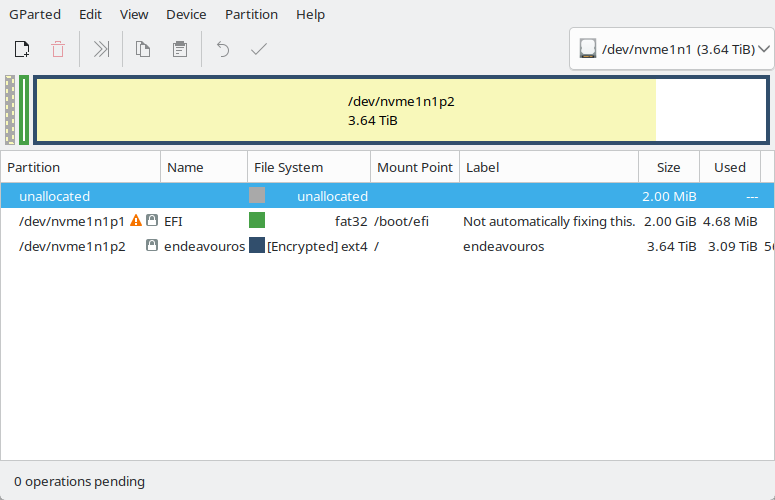
Take the "Partition" value for the LUKS [Encrypted] partition and put it in to this command
sudo cryptsetup open /dev/nvme1n1p2 endeavourosendeavouros can be anything you like as long as you use the same name in the /dev/mapper line below.

Mount the root (/) partition
sudo mount /dev/nvme1n1p2 /mnt
sudo mount /dev/mapper/endeavouros /mnt
Also mount the boot (/boot/efi) partitions
sudo mount /dev/nvme1n1p2 /mnt/boot/efi
Enter an Arch chroot, this will only exist on Arch based systems.
sudo arch-chroot /mnt
Reinstall GRUB
grub-install
Run
ls -la /mnt/boot/efi/EFI/boot/bootx64.efi
IF you have this file (you see a line containing -rw-r----- 1 root root) then ALSO run the command
grub-install --target=x86_64-efi --efi-directory=/boot/efi --removable
This installs GRUB to the default location your BIOS searches for bootloaders, which is how your PC may be set up instead of using the normal location stored in the EFI memory.
Press Ctrl+D to exit the chroot, then type reboot to restart the system and everything should work.